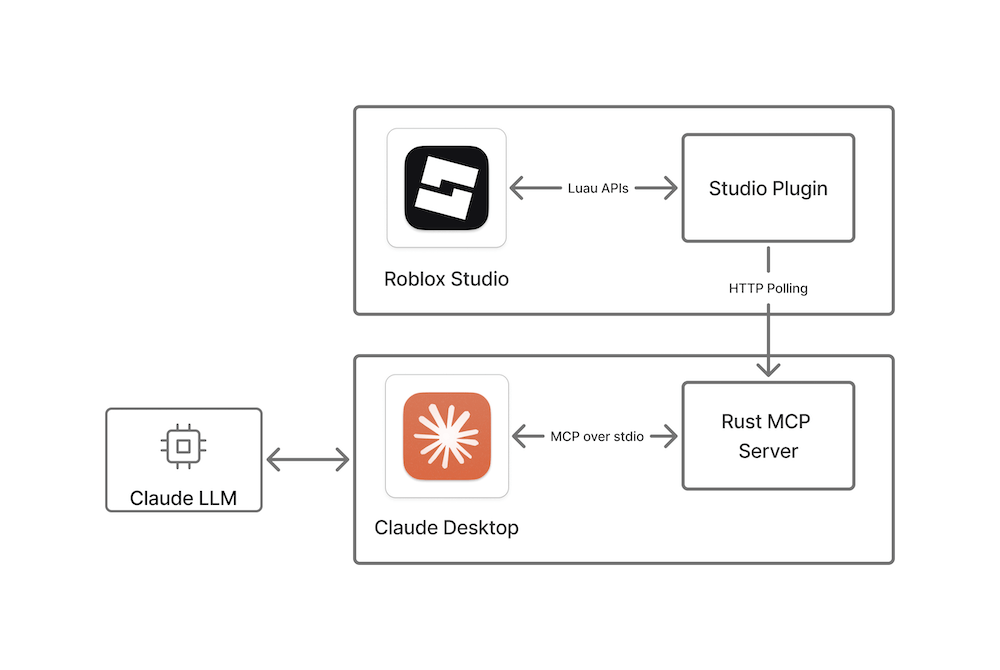
Finally, someone built the bridge between AI assistants and Roblox Studio that game developers have been waiting for. This MCP server lets Claude Desktop and Cursor directly interact with your Studio workspace - no copy-pasting code snippets or manual debugging sessions. Your AI can now run Lua commands, insert models from the Creator Store, monitor console output, and even manage play testing cycles.
The implementation is surprisingly clean: a Rust-based server handles the Model Context Protocol communication while a Studio plugin manages the actual workspace interactions through long polling. Setup takes literally 60 seconds - download the binary, restart your apps, and suddenly Claude can see your game’s structure, modify scripts in real-time, and help debug issues by actually running code in your environment. Six core tools cover everything from basic code execution to automated play mode testing.
This feels like the future of game development workflows. Instead of describing bugs or copying error logs, you can have your AI assistant directly inspect and fix issues in Studio. At 353 stars and backed by Roblox themselves, it’s already gaining traction among developers who want their AI to be more than just a fancy autocomplete.
⭐ Stars: 353
💻 Language: Rust
🔗 Repository: Roblox/studio-rust-mcp-server